
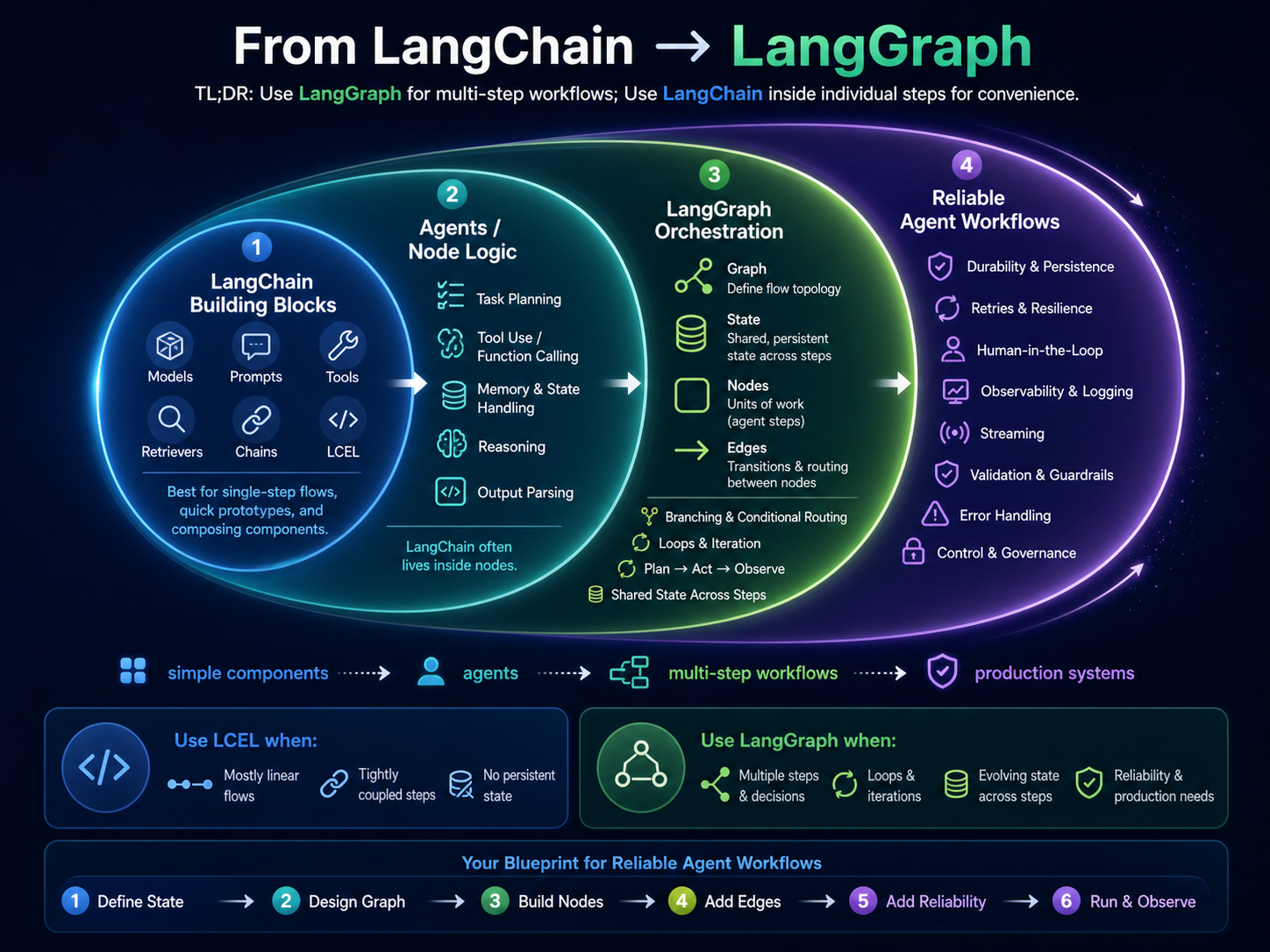
TL;DR
LangGraph handles the workflow orchestration (nodes, edges, state, control flow).
LangChain/LCEL handles individual steps (prompt composition, model calls, output parsing).
Events are runtime signals (tool_failed, human_approved, etc.) that edges use to decide what happens next.
Use LangGraph when you need loops, retries, human approvals, or state persistence. Use LCEL alone for simple, one-shot prompt→parse flows.
Why LangGraph Exists
Modern AI apps aren't single prompts; they're workflows: plan → call tools → validate → branch → maybe ask a human → retry → finish. LangGraph treats this as a graph with explicit nodes and edges, plus a durable state you can pause/resume, audit, and recover.
Think of your agent as a workflow with multiple decision points, not just a linear chain. You need explicit control flow, state management, and the ability to handle retries, approvals, and recovery.
The Four Primitives (and How Events Fit)
1. Graph
Your app's topology — named nodes and edges that form linear paths, branches, and loops. Makes control flow explicit and testable.
2. State
A persisted, typed dictionary that flows through the graph (messages, plan, observations). Each node reads state and returns partial updates; reducers merge them deterministically.
3. Node
A unit of work: planner, tool call, validator, router, human-approval gate. Internally, a node can use LangChain/LCEL while LangGraph provides orchestration around it.
4. Edges
Explicit control rules: next(A→B), conditional edges (guards), and loop edges. Edges examine state and recent events to decide routing, retries, and recovery.
Detailed Reference
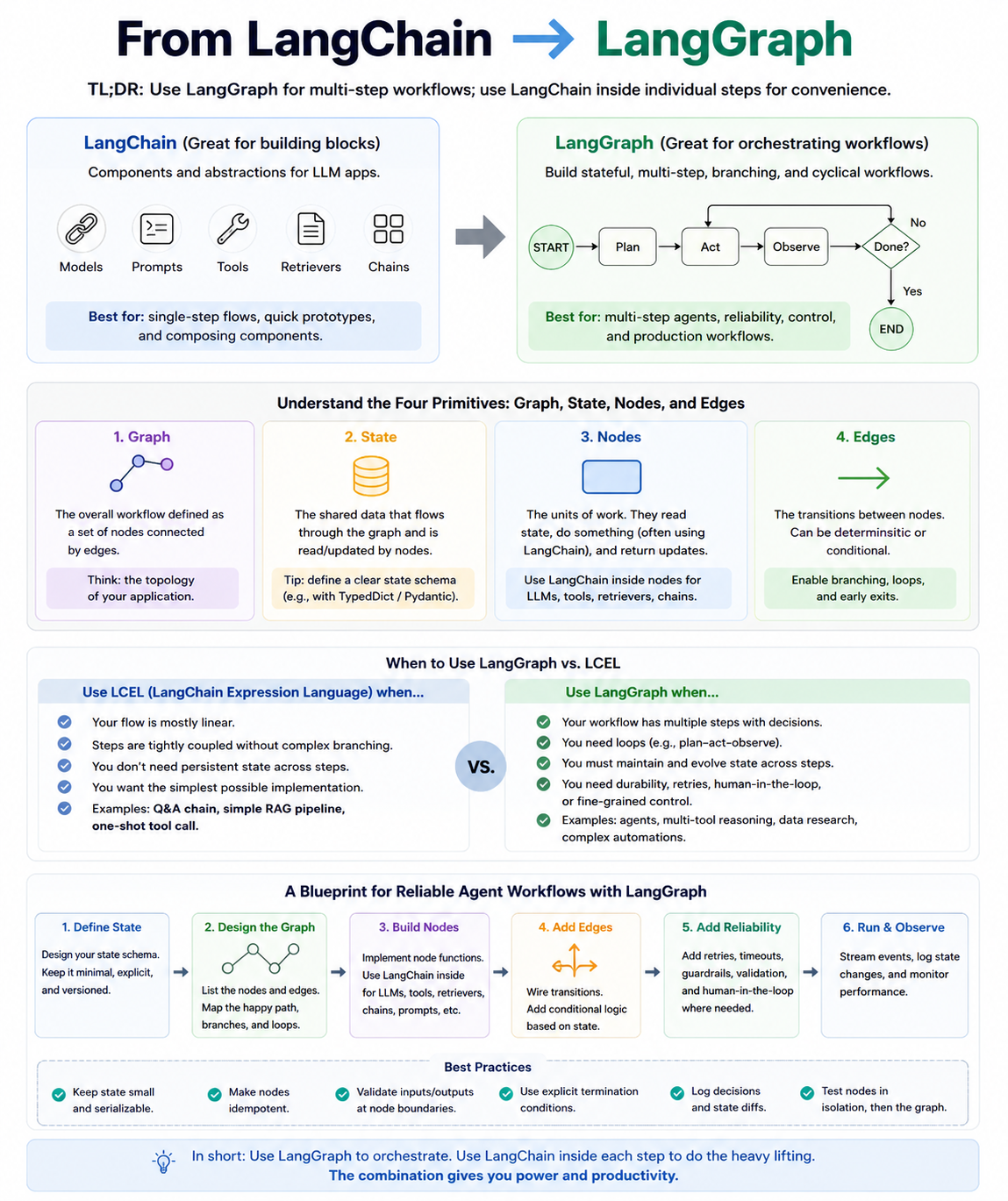
The four primitives, when to use LCEL vs. LangGraph, and a 6-step blueprint for reliable agent workflows.
Where “Events” Fit
Events are runtime signals — tool_succeeded, validation_failed, human_approved, timeout_fired. They're inputs that nodes emit and edges consult to branch, loop, or pause/resume the run.
Example: When a tool fails, an edge routes to a retry node with backoff based on the tool_failed event.
Example: When approval is requested, the runner pauses until a human_approved event arrives.
Why Not “Just LangChain” for This
Deterministic Control
Complex branching/loops and guarded routes are clearer in a graph than nested callbacks.
Durability & Observability
Checkpoints, resume after failure, and auditable steps/events are first-class in LangGraph.
Human-in-the-Loop
Clean pauses on events and resumes with updated state are fundamental, not an add-on.
When to Use Which
Choose LangGraph when:
- •Multi-step agents (plan→act→observe) with guarded routing and loops
- •Durability (checkpoints), resumability, and human gates
- •Retries/backoff, idempotent recovery, and time-boxed tasks
Choose LCEL alone when:
- •A straight, stateless pipeline (RAG answer with a parser)
- •Fast to build, no branching required
- •Simple prompt → model → parse workflows
Best Practice — Combine Them:
Use LangGraph for Graph + State + Edges (the workflow brain). Implement each Node with LCEL/LangChain for ergonomic prompt/model/parsing logic. You get step-level developer speed with workflow-level reliability.
Putting It Together: A Reusable Blueprint
Initialize State
Seed messages, plan, and context (user query, retrieved docs). Checkpoint.
state = { messages: [user_query], plan: null, observations: [], context: retrieved_docs }Planner Node
Produces a plan (LCEL inside), emits plan_ready event, updates state. Edge guard: if risky action → route to approval.
Approval Node
Pauses on approval_requested; resumes on human_approved / human_rejected. Edge chooses proceed or cancel.
Act Node (Tools)
Executes a tool call (LCEL/tool wrapper). On tool_failed, edge loops back with exponential backoff; on tool_succeeded, continue.
Validate Node
Checks outputs (schema/guardrails). If validation_failed, edge loops to planner or act; else finish. Checkpoint.
Finish Node
Collates final messages/result from state and returns.
Quick Decision Table
| Situation | Pick | Why |
|---|---|---|
| One-shot prompt → model → parse | LCEL | Minimal plumbing; no branching needed. |
| Agent with tools, retries, approvals | LangGraph | Graph-level guards, checkpoints, events, loops. |
| Complex workflow, ergonomic step logic | Both | LCEL inside nodes; LangGraph for orchestration. |
Takeaway
1. Model the workflow (Graph/Nodes/Edges) and persist the state; let events move you through the graph.
2. Keep step internals ergonomic with LCEL, but avoid using it to simulate orchestration.
3. For reliability, recovery, and human-in-the-loop, LangGraph is the right abstraction, with LCEL as the implementation detail inside nodes.
Essential Tools
LangGraph
Orchestration framework for stateful, reliable agent workflows.
- • Graph-based workflow definition
- • State management with checkpointing
- • Event-driven control flow
- • Human-in-the-loop support
LangChain & LCEL
Use inside nodes for prompt composition, model calling, output parsing.
- • Expressive prompt chaining
- • Model abstraction (OpenAI, Anthropic)
- • Output parsers & structured extraction
- • Tool integration
Observability:
Langfuse for traces, LangSmith for debugging, custom dashboards
State Storage:
In-memory (dev), PostgreSQL (prod), Redis for caching
Quick Start Example
Basic Agent Structure:
from langgraph.graph import StateGraph, END
from langchain_core.prompts import ChatPromptTemplate
from langchain_openai import ChatOpenAI

# Define state
class AgentState(TypedDict):
    messages: list
    plan: str | None
    observations: list

# Create graph
workflow = StateGraph(AgentState)

# Add nodes (use LCEL inside)
def planner_node(state: AgentState):
    prompt = ChatPromptTemplate.from_template("{input}")
    llm = ChatOpenAI()
    chain = prompt | llm
    plan = chain.invoke({"input": state["messages"][-1]})
    return {"plan": plan.content}

workflow.add_node("planner", planner_node)
workflow.add_edge("planner", END)
workflow.set_entry_point("planner")

# Compile and run
app = workflow.compile()
This is a minimal example. In production, add more nodes, conditional edges, error handling, and state checkpointing.